

Your basket
Free Allergen Chart Maker: Your Menu’s 14 Allergens on One Printable Chart
Our free allergen chart maker turns your menu into a printable allergen chart in a few minutes. Type each dish, tap the allergens it contains, and download a PDF with the chart and a matching customer allergy sign, in English or any of 15 languages, side by side with a second language if you like.
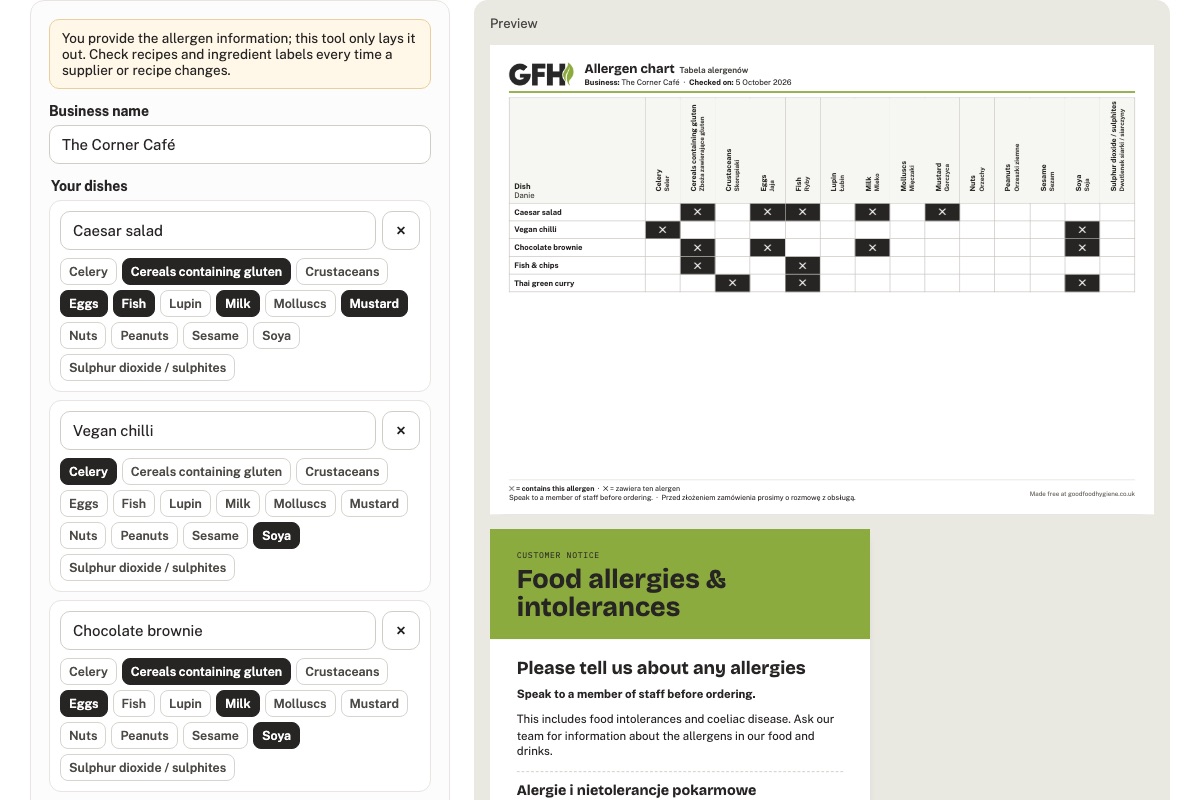
Every food business in the UK has to be able to tell customers which of the 14 allergens are in the food it serves. For most cafés, restaurants and takeaways the simplest, most reliable way to do that is an allergen chart: every dish down the side, the 14 allergens across the top, and a clear mark where a dish contains one. The hard part is keeping it neat, accurate and up to date. That is what this tool is for.
What the law asks of you
The Food Standards Agency’s guidance is clear: if you serve non-prepacked food, you must supply allergen information for every item that contains any of the 14 allergens. You can do that in writing, on a menu, a chalkboard or an information pack, or verbally, as long as there is a written notice in a clearly visible place explaining how customers can get the information. The FSA’s own advice is that written allergen information, supported by a conversation, works best for customers.
The allergen chart is the written information, and the counter sign is the written notice that tells customers to ask. The tool gives you both.
One exception matters: food you pack on your own premises before a customer orders it, such as wrapped sandwiches on a shelf, is “prepacked for direct sale” (PPDS). It needs a full label with the ingredients and the allergens emphasised. A chart on the wall does not replace that label.
The 14 allergens
Celery, cereals containing gluten, crustaceans, eggs, fish, lupin, milk, molluscs, mustard, nuts, peanuts, sesame, soya, and sulphur dioxide and sulphites. They are the allergens UK law names, and the chart lists them in that order, using the same names as our free 14 Allergens poster.
How to use the allergen chart maker
- Open the allergen chart maker and type your business name.
- Add each dish and tap every allergen it contains. Work from your recipes and the ingredient labels, not from memory.
- Choose the language, and a second language for your team or your customers if you like.
- Choose the chart, the counter sign, or both, and press Download PDF. Downloading and saving need a free account, which takes about 20 seconds; your chart is kept while you sign up.
- Save the chart to your account. When a recipe or a supplier changes, edit that dish and download a fresh chart with the new date on it.
Keeping it accurate
- You provide the allergen information; the tool only lays it out. Check recipes, product specifications and ingredient labels, including sauces, dressings, garnishes and anything bought in.
- Update the chart every time a recipe, a supplier or a product changes, and reprint it. The “Checked on” date shows when it was last checked.
- Keep ingredients in their original or labelled containers so anyone can check them.
- Make sure every member of staff knows where the chart is and who to ask when a customer has a question. Never guess.
Charts in your team’s language
The chart and the counter sign print in English, Welsh, Polish, Romanian, Spanish, Portuguese, French, German, Russian, Ukrainian, Chinese, Hindi, Bengali, Urdu or Arabic, and you can show two languages together, for example English for customers and Polish for the kitchen team. The allergen names use the wording on our translated 14 Allergens poster.
Make your allergen chart now
Free, in 15 languages, with your own dishes on it.
Open the allergen chart makerRelated free downloads
- The 14 Allergens
- Customer Allergy Notice
- Managing Allergy Orders
- Allergen Information for Online & Phone Orders
Free to download and print with a free account. See all our free posters and record sheets.